









































How to Prevent WordPress Tag Pages from Becoming Duplicate Content in Moz
Learn how to prevent WordPress tag pages from creating duplicate content warnings in Moz. See when to noindex tags, optimize useful tag archives and avoid SEO problems.

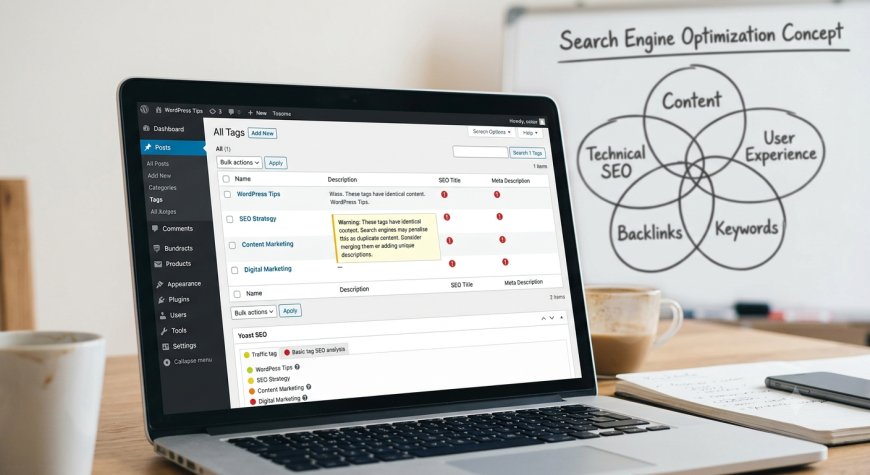
How to Prevent WordPress Tag Pages from Becoming Duplicate Content in Moz
If Moz is reporting duplicate content or similar-content issues on your WordPress tag pages, don't panic. This is a common problem on WordPress websites, especially when many posts use similar tags.
WordPress automatically creates an archive page for each tag. For example, if you publish several articles with the tag WordPress SEO, WordPress may create a page such as /tag/wordpress-seo/ that lists those articles.
The problem is that these tag archive pages can contain very similar content to your category pages, homepage, or other tag archives. SEO crawlers such as Moz can therefore identify them as duplicate or near-duplicate pages.
The good news is that you don't necessarily need to delete your tags. The right solution depends on whether your tag pages provide genuine value to visitors.
Table of Contents
- What Are WordPress Tag Pages?
- Why Does Moz Flag Tag Pages as Duplicate Content?
- Does Duplicate Content Mean a Google Penalty?
- What Is the Best Solution?
- How to Noindex WordPress Tag Pages
- How to Noindex Tags With Yoast SEO
- How to Noindex Tags With Rank Math
- When Should You Keep Tag Pages Indexed?
- How to Optimize Useful Tag Pages
- What to Do If You Have Too Many WordPress Tags
- Should You Ignore Tag Pages in Moz?
- Common Tag SEO Mistakes
- Frequently Asked Questions
- WordPress Tag SEO Checklist
What Are WordPress Tag Pages?
A WordPress tag page is an archive page automatically created when you assign a tag to one or more posts.
For example, if your website has posts tagged:
- WordPress
- SEO
- AI Tools
- Google Search
WordPress can create separate archive URLs for each of those tags.
A tag archive normally displays a collection of posts that use that particular tag. Depending on your WordPress theme, it may also contain a tag title, description, featured images and excerpts.
These pages are useful for website navigation, but not every tag archive needs to appear in Google.
Why Does Moz Flag Tag Pages as Duplicate Content?
Moz crawls your website and compares pages to identify content that is identical or very similar.
A tag archive can trigger this type of warning because several archive pages may contain the same or nearly the same post listings.
For example, imagine you have these tags:
- WordPress SEO
- WordPress Tips
- SEO Tips
If the same five articles are assigned to all three tags, the three archive pages can become extremely similar.
You may also have a category page showing those same articles. This creates several URLs with overlapping content.
That is why a large WordPress website can end up with hundreds or even thousands of low-value archive URLs.
Does Duplicate Content Mean a Google Penalty?
No. A duplicate-content warning from an SEO crawler does not automatically mean Google has penalized your website.
The more important issue is whether your website contains many URLs that provide little unique value and whether search engines are being asked to index all of them.
Google can generally handle duplicate or similar pages, but you should still avoid creating unnecessary indexable URLs.
The goal is simple: make your important pages clear and prevent low-value archive pages from competing with them.
What Is the Best Solution for WordPress Tag Pages?
There are three main approaches.
| Situation | Recommended action |
|---|---|
| Thin tag page with little unique value | Noindex it |
| Many tags containing the same posts | Reduce/clean up tags and noindex low-value archives |
| Important tag page with unique content and search demand | Keep indexed and optimize it |
For most small and medium WordPress websites, noindexing tag archives is the simplest solution when those pages are not intentionally designed as SEO landing pages.
How to Noindex WordPress Tag Pages
You don't normally need to edit your site's robots.txt file to solve this problem.
Instead, use your SEO plugin to tell search engines not to include tag archives in their search results.
A noindex, follow directive allows search engines to crawl the page and follow its links while telling them not to show that tag archive as a search result.
This is different from blocking the page in robots.txt. If you want search engines to understand the links and content relationships on your site, noindex is usually the more appropriate control for an unwanted archive.
How to Noindex Tag Pages With Yoast SEO
If you use Yoast SEO, you can control whether tag archives appear in search results from its taxonomy settings.
- Log in to your WordPress dashboard.
- Open Yoast SEO → Settings.
- Go to the section for Categories & tags.
- Open the settings for Tags.
- Turn off the option that allows tag archives to appear in search results.
- Save your changes.
Yoast's current documentation confirms that entire taxonomies such as tags can be excluded from search results through its settings.
How to Noindex Tag Pages With Rank Math
If you use Rank Math, the exact menu names can vary slightly depending on your version, but the principle is the same: configure your tag taxonomy to use a noindex robots directive.
You can also use Rank Math's individual SEO controls when you need to change the indexing behavior of a specific taxonomy or URL.
For individual pages that contain similar content, Rank Math also provides canonical URL controls, which can tell search engines which URL should be treated as the preferred version.
When Should You Keep Tag Pages Indexed?
You should not automatically noindex every tag page on every website.
A tag page can be valuable when it acts as a genuine topic hub.
For example, on an African technology website, a tag such as AI Tools could become useful if it contains:
- A unique introduction explaining the topic
- Relevant articles covering different search intents
- A meaningful collection of related content
- A useful title and description
- Enough content to satisfy visitors
In that situation, the tag archive is more than a duplicate list of posts. It becomes a useful landing page.
How to Optimize Useful WordPress Tag Pages
If you decide to keep a tag page indexable, don't create dozens of nearly identical tags.
Instead:
1. Give the tag a clear purpose
Every indexable tag should represent a meaningful topic that visitors might actually want to explore.
2. Avoid creating tags for every keyword
Tags are not a place to add every possible keyword variation.
For example, these tags may be unnecessarily repetitive:
- WordPress SEO
- SEO WordPress
- WordPress SEO Tips
- SEO Tips WordPress
Depending on your content, one well-organized topic may be better than four almost-identical tag archives.
3. Add a useful tag description
If your WordPress theme and SEO setup support it, add an original description explaining what visitors will find on the tag page.
4. Use tags consistently
Decide what your tags are designed to represent and stick to that system.
Don't create a new tag every time you publish an article.
What If You Already Have Hundreds of WordPress Tags?
If your website has accumulated a large number of tags, don't delete everything immediately.
First, audit them.
Look for:
- Tags containing only one article
- Tags containing almost the same articles
- Very similar tag names
- Spelling variations
- Tags created only for SEO keywords
- Tag pages appearing in Moz duplicate-content reports
- Tag pages receiving no meaningful organic traffic
You can then consolidate related tags and remove unnecessary ones.
If a tag has valuable backlinks or has already established search visibility, don't delete its URL without considering redirects and the impact on existing links.
Should You Ignore Tag Pages in Moz?
Sometimes, yes.
If your tag pages are intentionally kept out of search results and Moz is simply reporting them because it can crawl those URLs, you don't necessarily need to keep treating the report as an active SEO problem.
Moz's guidance specifically notes that if WordPress tag pages are creating duplicate-content reports, you can use its Ignore functionality so the same issue is not repeatedly flagged. If you don't want the tag pages appearing in search results, you can instead add a noindex directive.
However, don't use Ignore as a substitute for fixing a real website architecture problem. First decide whether the tag pages should be indexable.
Common WordPress Tag SEO Mistakes
Using too many tags
Adding ten or twenty tags to every article can quickly create a large number of overlapping archive pages.
Creating tags that are almost identical
Different tag names that lead to almost identical article collections can create unnecessary URL duplication.
Indexing every archive automatically
Just because WordPress creates a URL does not mean that URL needs to compete in Google.
Deleting tag pages without checking links
Before deleting an established tag URL, check whether it receives traffic or backlinks. If it does, consider whether a redirect or another consolidation strategy is appropriate.
Using canonical tags as a universal solution
A canonical can help search engines understand which URL is preferred when similar pages exist, but it should not be used as a substitute for good site architecture.
If a tag archive has no real search value, noindexing it is often cleaner than trying to canonicalize every tag to another page.
Frequently Asked Questions
Are WordPress tag pages bad for SEO?
No. Tag pages are not automatically bad for SEO. They become a problem when a website creates many low-value, thin or highly overlapping tag archives and allows all of them to be indexed.
Should I noindex all WordPress tags?
Not necessarily. If your tag archives are useful topic pages with unique value, you can keep them indexed. If they simply duplicate category and post listings, noindexing them is usually the better choice.
Does Moz duplicate content hurt my Google rankings?
A Moz warning itself does not cause a ranking penalty. It is a diagnostic signal that should help you identify pages that may be too similar or unnecessary.
Should I delete WordPress tags?
Not automatically. First determine whether the tags are useful for navigation, search visibility or internal organization. Consolidate unnecessary tags rather than deleting valuable URLs blindly.
Is noindex better than robots.txt for tag pages?
When the goal is to keep a page out of search results while still allowing crawlers to access its links, noindex is generally the more appropriate approach. A robots.txt block prevents crawling, which can make it harder for search engines to see the noindex directive.
Can I keep tag pages for visitors but prevent Google from indexing them?
Yes. You can keep the tag archives available to users while setting them to noindex, follow. This is one of the main reasons noindex is useful for WordPress archive pages.
WordPress Tag SEO Checklist
- ☐ Audit your existing tag archives
- ☐ Identify duplicate or near-duplicate tag pages
- ☐ Remove unnecessary tag variations
- ☐ Consolidate overlapping tags
- ☐ Decide which tags genuinely deserve Google visibility
- ☐ Noindex thin or low-value tag archives
- ☐ Keep useful topic hubs indexable
- ☐ Add unique descriptions to important tag pages
- ☐ Review duplicate-content reports in Moz after changes
- ☐ Monitor Google Search Console for indexing changes
Final Thoughts
Seeing WordPress tag pages reported as duplicate content in Moz does not mean your website is being penalized. It usually means your site has multiple archive URLs containing very similar information.
For most websites, the best approach is to keep the WordPress tagging system simple and prevent low-value tag archives from entering Google's index. For important tags that genuinely serve as topic hubs, invest in unique descriptions and useful content instead.
The goal isn't to eliminate every duplicate-content warning in an SEO tool. The goal is to build a WordPress site where every indexable URL has a clear purpose and provides value to searchers.
Related Fyndin Guides
- How to Optimize Your WordPress Site for AI Search & Google AI Overviews
- How to Fix Duplicate Content from WordPress Categories & Tags
Last reviewed: September 2026
What's Your Reaction?
 Like
0
Like
0
 Dislike
0
Dislike
0
 Love
0
Love
0
 Funny
0
Funny
0
 Angry
0
Angry
0
 Sad
0
Sad
0
 Wow
0
Wow
0