

































MTN MoMo Merchant Payment Failed in Rwanda 2026: How to Fix It
Learn how to fix MTN MoMo merchant payment failed errors in Rwanda in 2026. Discover common causes, solutions, and tips to complete your payment successfully.

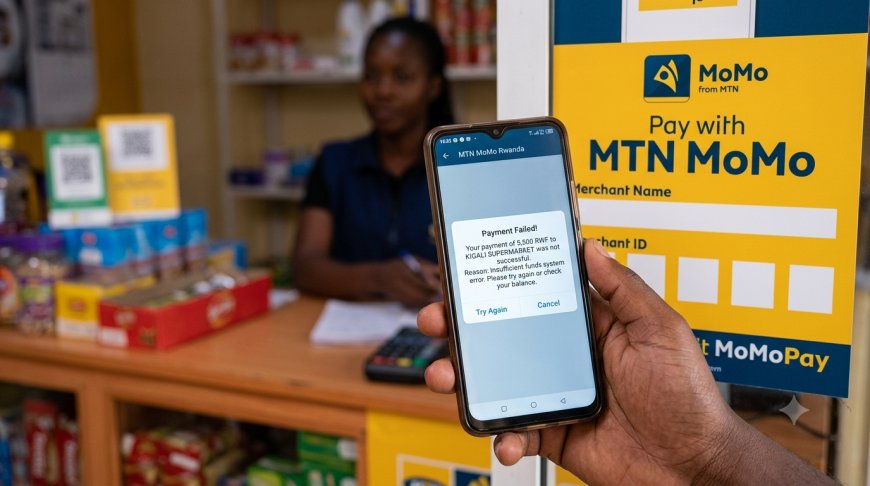
MTN MoMo Merchant Payment Failed in Rwanda 2026: How to Fix It
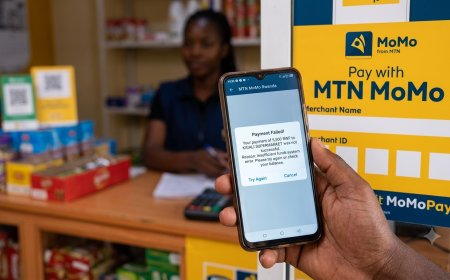
If your MTN MoMo merchant payment failed in Rwanda, do not immediately make the payment again. The first thing to establish is whether the transaction actually failed, is still pending, or was completed but has not yet appeared on the merchant's side.
This distinction matters because sending the money again before checking the first transaction can result in a duplicate payment.
MTN Rwanda's MoMo Pay service is designed for customers to pay merchants for goods and services through Mobile Money. MTN's merchant terms define a payment as money transferred from a customer to a merchant for goods or services through the merchant-payment system.
Quick answer: If an MTN MoMo merchant payment fails, first check your balance, transaction history and confirmation message. Confirm whether the transaction is successful, pending or failed. If money was deducted but the merchant did not receive it, do not pay again immediately. Keep the transaction reference and contact MTN if the issue remains unresolved.
Table of Contents
- What Is MTN MoMo Pay?
- Why Does an MTN MoMo Merchant Payment Fail?
- What to Do Immediately After a Failed Payment
- How to Check Whether the Payment Actually Failed
- Money Was Deducted but the Merchant Did Not Receive It
- What If the MTN MoMo Payment Is Pending?
- Merchant Did Not Receive the Payment Confirmation
- What If You Paid the Wrong Merchant?
- Should You Try the Payment Again?
- MTN MoMo Pay Fees in Rwanda
- MTN MoMo Transaction Limits and Large Payments
- How to Pay a Merchant Using MTN MoMo
- MTN MoMo Merchant Payment Troubleshooting Table
- How to Contact MTN Rwanda About a Failed Payment
- Information to Give MTN Customer Care
- How to Avoid MoMo Merchant Payment Problems
- For Merchants: What to Do When a Customer Says They Paid
- Frequently Asked Questions
- Final Takeaway
What Is MTN MoMo Pay?
MTN MoMo Pay is a Mobile Money payment service used by customers to pay participating merchants for goods and services.
It is different from an ordinary person-to-person transfer because the recipient is a registered merchant using MTN's merchant-payment service.
MoMo Pay can therefore be used when paying businesses such as shops, restaurants, service providers and other participating merchants.
MTN's current MoMo Pay information confirms that the merchant is responsible for the MoMo Pay fee and that the customer is not required to make an additional payment for the service.
Why Does an MTN MoMo Merchant Payment Fail?
A merchant payment can fail for several reasons. In many cases, the error is temporary, but you should determine the transaction status before trying again.
1. Insufficient MoMo balance
Your available balance may not be enough to complete the transaction.
This can happen when you have recently made another payment, transferred money, withdrawn cash or have an amount temporarily reserved by another transaction.
Check your balance before attempting the payment again.
2. Incorrect merchant information
If the wrong merchant details are entered, the payment may fail or, depending on what was entered and confirmed, money may be sent somewhere other than intended.
Always check the merchant information and amount displayed on your phone before entering your PIN.
3. Temporary network problem
Mobile Money transactions depend on network and transaction-processing systems. A temporary service problem can prevent a payment from completing normally.
If the failure happens repeatedly, wait and check whether other MoMo services are also experiencing problems before making multiple attempts.
4. Transaction limit
Having enough money in your wallet does not necessarily mean that every transaction can be completed. Applicable transaction limits can also affect a payment.
For unusually large transactions, check the latest MTN tariff and applicable account limits.
MTN currently states that customers can transact up to RWF 10 million per day through MoMo, although the applicable limit for a particular transaction or service should still be checked.
5. Merchant-side problem
The problem may not be with your wallet at all.
A merchant can experience a problem with their payment setup, account, device, network connection or transaction records.
This is why it is important to compare your transaction status with what the merchant sees.
6. Temporary transaction-processing problem
A transaction can sometimes encounter a processing problem even when your balance is sufficient and the merchant information is correct.
In this situation, your transaction status and balance are more useful than simply repeating the payment.
7. The payment may not actually have failed
One of the most common mistakes is assuming that an error message means the money was never processed.
Always check the transaction history and balance before starting a second payment.
What to Do Immediately After a Failed Payment
Use this order instead of immediately trying again:
- Stop and do not resend the money immediately.
- Check your current MoMo balance.
- Check your transaction history.
- Read the latest SMS or notification.
- Ask the merchant to check their payment records.
- Determine whether the transaction is successful, pending or failed.
- If the money was deducted, keep the transaction reference.
- Contact MTN if the transaction remains unresolved.
If you are not certain what happened to the first transaction, investigate it before paying again.
How to Check Whether the Payment Actually Failed
There are three important sources of information to compare:
Your MoMo balance
Check whether the payment amount has actually been deducted.
A failure message combined with an unchanged balance is different from a failure message followed by a deduction.
Your transaction history
Your transaction history provides a better record of what happened than relying only on what appeared on the screen at the time of payment.
If you frequently use MTN MoMo, it is useful to know how to access your transaction history.
Read: How to Check MTN MoMo Transaction History in Rwanda.
Your SMS or payment notification
Keep the transaction message, particularly when the amount is significant.
The information in the confirmation can help you and MTN identify the transaction if you need assistance.
Money Was Deducted but the Merchant Did Not Receive It
This is the situation where customers should be especially careful.
If your MoMo balance has decreased but the merchant says they have not received the money, do not automatically make another payment.
If the transaction is successful
Keep the confirmation and provide the relevant transaction details to the merchant.
Ask the merchant to check their merchant records carefully.
If the payment is confirmed as successful but the merchant still cannot locate it, contact MTN for assistance.
If the transaction is pending
A pending transaction should be treated as unresolved rather than immediately treated as a failed transaction.
Monitor the transaction and avoid sending the same amount again until you know what happened to the first attempt.
See our detailed guide: MTN MoMo Pending Transaction in Rwanda 2026.
If the transaction is failed
Check whether the deducted amount has returned to your MoMo balance.
If your money remains deducted and the transaction is not resolved, keep the reference and contact MTN.
Related guide: MTN MoMo Money Deducted but Transaction Failed in Rwanda.
What If the MTN MoMo Payment Is Pending?
A pending transaction requires a different approach from an immediately failed transaction.
If the payment remains pending:
- Do not immediately repeat the payment.
- Check your transaction status again.
- Check whether the amount remains deducted.
- Ask the merchant to wait while the original transaction is being resolved.
- Keep the transaction reference.
- Contact MTN if the transaction does not resolve normally.
A duplicate payment can create a second problem if the original pending transaction eventually completes.
Merchant Did Not Receive the Payment Confirmation
Sometimes the customer believes the transaction was successful while the merchant says no confirmation appeared.
Do not rely solely on the merchant's phone notification.
Compare:
- Payment amount
- Transaction time
- Merchant information
- Your transaction status
- Your MoMo balance
- Your transaction reference
If your records show a successful transaction, the merchant should investigate their merchant-side records before you attempt another payment.
What If You Paid the Wrong Merchant?
If you accidentally paid the wrong merchant or entered incorrect payment information, act as quickly as possible.
Do not assume that a completed payment can simply be cancelled from your phone.
Keep the transaction confirmation and contact MTN through an official support channel.
For more information, read:
How to Reverse a Wrong MTN MoMo Transaction in Rwanda.
Should You Try the Payment Again?
Only after checking the first transaction.
A second payment is reasonable when you have established that the first transaction did not complete and the money was not deducted.
Before trying again, confirm:
- Your balance is sufficient.
- The merchant information is correct.
- The payment amount is correct.
- The first transaction is confirmed as failed or otherwise unsuccessful.
- There is no known service problem affecting the transaction.
If the first transaction was successful or is still pending, do not automatically send the money again.
MTN MoMo Pay Fees in Rwanda
MTN's current MoMo Pay FAQ lists the following fee structure:
| Transaction Amount | MoMo Pay Fee | Who Pays? |
|---|---|---|
| Below RWF 4,000 | Free | No extra customer payment |
| Above RWF 4,001 | 0.5% | Merchant |
MTN states that the merchant pays the MoMo Pay fee and that the customer is not required to make an additional payment.
This should not be confused with ordinary person-to-person MoMo transfer charges, which use a different tariff structure.
Example: RWF 10,000 merchant payment
If the merchant payment falls under the 0.5% MoMo Pay fee category, the merchant-side fee would be calculated separately from the customer's payment amount.
The customer should not add an extra MoMo Pay charge simply because they are paying a merchant.
MTN MoMo Transaction Limits and Large Payments
Transaction limits can change and can also differ according to the service being used.
MTN's current Rwanda website states that customers can transact up to RWF 10 million per day through MoMo.
For a large merchant purchase, however, do not rely only on a general daily figure. Check the current MTN tariff and the specific transaction route you are using.
For a complete explanation of MoMo limits and related charges, see:
MTN MoMo Transaction Limits in Rwanda 2026.
How to Pay a Merchant Using MTN MoMo
The exact customer interface can change as MTN updates its MoMo service, so follow the options currently displayed on your phone.
The general process is:
- Open the MTN MoMo service or MoMo App.
- Select the merchant-payment or MoMo Pay option available to you.
- Enter or scan the merchant's payment details where supported.
- Enter the amount.
- Check the merchant information carefully.
- Check the amount again.
- Confirm using your MoMo PIN.
- Wait for the transaction confirmation.
- Keep the confirmation until the merchant confirms receipt.
MTN's MoMo App supports payments and other Mobile Money functions and is available for Android and iOS.
MTN MoMo Merchant Payment Troubleshooting Table
| What Happened? | What You Should Do |
|---|---|
| Payment failed and balance did not change | Check the merchant details and try again only after confirming the first transaction failed. |
| Payment failed but money was deducted | Do not resend. Keep the transaction reference and investigate the transaction. |
| Payment is pending | Wait for the transaction to resolve and avoid a duplicate payment. |
| Merchant says payment was not received | Compare your transaction status, reference, amount and time with the merchant's records. |
| Wrong merchant paid | Contact MTN promptly and keep the transaction information. |
| Payment keeps failing | Check balance, limits and network/service status before contacting MTN. |
How to Contact MTN Rwanda About a Failed Payment
MTN Rwanda provides several official support options for MoMo customers.
Toll-free customer care: 100
Email: customercare.rw@mtn.com
WhatsApp: +250 788 310 044
MTN's current MoMo Pay support page lists these channels and gives its Kigali physical address as MTN Centre, KG 9 Ave. It lists working hours as Monday to Friday, 8 AM–9 PM, and weekends, 9 AM–5 PM.
MTN also provides an online MoMo Complaints form for customers who need to submit a complaint about MoMo services.
Information to Give MTN Customer Care
When reporting a failed or disputed merchant payment, prepare as much transaction information as possible.
- MTN phone number used for the payment
- Transaction date
- Approximate transaction time
- Amount paid
- Merchant name or merchant details
- Transaction reference
- SMS or notification received
- What happened after the payment was attempted
Providing complete information can make it easier for customer care to identify the relevant transaction.
How to Avoid MoMo Merchant Payment Problems
Check the merchant before entering your PIN
Your PIN is the final authorization step. Before entering it, verify the amount and merchant details displayed on your phone.
Never share your MoMo PIN
Do not give your PIN to a merchant, agent or person claiming to be customer care.
Do not trust screenshots alone
If someone claims that a payment was made, verify the transaction through the appropriate MoMo records instead of relying only on a screenshot.
Keep important transaction messages
For larger purchases, retain the transaction confirmation until the merchant confirms that the payment has been received.
Do not pay twice because a merchant is impatient
If your first transaction is still pending or has been deducted from your balance, investigate it before making another payment.
Use official MTN support
For unresolved transactions, use MTN's official customer-care channels. MTN also provides dedicated forms for MoMo complaints and fraud reports.
For Merchants: What to Do When a Customer Says They Paid
If you operate a business and a customer says their MoMo payment was successful but your side does not show it, do not immediately ask the customer to pay again.
First:
- Ask for the transaction confirmation.
- Check the amount and approximate transaction time.
- Check your merchant transaction records.
- Confirm that the payment was made to the correct merchant.
- Compare the transaction reference where available.
- If the transaction remains unresolved, contact MTN support.
This approach protects both the customer and the merchant from accidental duplicate payments.
MTN's merchant terms describe the merchant Mobile Money account as the account through which a merchant receives customer payments, and define MoMo Pay transactions as payments for goods and services.
Frequently Asked Questions
Why is my MTN MoMo merchant payment failing?
Possible reasons include insufficient balance, incorrect merchant details, transaction limits, temporary network problems, merchant-side problems or a temporary transaction-processing issue.
What should I do if my MoMo payment failed but money was deducted?
Do not immediately make another payment. Check your transaction status and balance, keep the transaction reference and contact MTN if the money remains deducted without a clear resolution.
Why did the merchant not receive my MoMo payment?
The payment may still be processing, the merchant may not have checked the correct transaction record, or there may be a technical problem. Compare your transaction status and reference with the merchant's records.
Should I send the money again if the first MoMo payment failed?
Only after confirming that the first transaction did not complete and that the money was not deducted. Sending the payment again without checking can create a duplicate payment.
Does MTN MoMo Pay charge customers in Rwanda?
MTN currently states that customers are not required to make an additional MoMo Pay payment. The merchant pays the MoMo Pay fee.
How much is the MoMo Pay merchant fee?
MTN currently lists MoMo Pay as free below RWF 4,000 for multiple transactions and 0.5% above RWF 4,001. The fee is charged to the merchant.
What is the MTN Rwanda customer-care number?
MTN Rwanda currently lists 100 as its toll-free customer-care number. It also lists WhatsApp support at +250 788 310 044.
Can I complain about an MTN MoMo transaction online?
Yes. MTN Rwanda provides an online MoMo Complaints form where customers can submit information about a complaint related to MoMo services.
What if I paid the wrong merchant?
Keep the transaction information and contact MTN as soon as possible. Do not assume that the payment will automatically reverse.
Can a merchant charge me the MoMo Pay fee?
MTN's current MoMo Pay FAQ states that the merchant pays the MoMo Pay fee and that the customer is not required to make an additional payment.
What if the same merchant payment keeps failing?
Check your balance, merchant information and applicable limits. If the problem continues, contact MTN because the issue may require investigation on the network or merchant side.
Final Takeaway
A failed MTN MoMo merchant payment should not automatically lead to another payment.
The safest approach is to check the transaction before retrying it. Look at your balance, transaction history and confirmation message, then compare the information with what the merchant sees.
If the transaction failed and no money was deducted, you can normally address the original problem before trying again. If the money was deducted, the payment is pending, or the transaction appears successful but the merchant cannot locate it, keep the transaction reference and contact MTN for assistance.
For current MoMo support, MTN Rwanda lists 100, customercare.rw@mtn.com and WhatsApp +250 788 310 044.
Related Fyndin Guides
- How to Check MTN MoMo Transaction History in Rwanda
- MTN MoMo Pending Transaction in Rwanda 2026
- MTN MoMo Money Deducted but Transaction Failed in Rwanda
- MTN MoMo Sent Money but Recipient Has Not Received It
- How to Reverse a Wrong MTN MoMo Transaction in Rwanda
- MTN MoMo Transaction Limits in Rwanda 2026
- MTN Rwanda MoMo Tariff 2026
- How to Reset or Change Your MTN MoMo PIN in Rwanda
Official MTN Rwanda Sources
- MTN Rwanda – MoMo Pay
- MTN Rwanda – Complaint Forms
- MTN Rwanda – MoMo Tariffs
- MTN Rwanda – MoMo App
- MTN Rwanda – MoMo Pay Merchant Terms and Conditions
Editorial note: MTN MoMo fees, limits, menus and support procedures can change. This article is intended as a practical 2026 guide; check MTN Rwanda's official channels for the latest transaction-specific information.
What's Your Reaction?
 Like
0
Like
0
 Dislike
0
Dislike
0
 Love
0
Love
0
 Funny
0
Funny
0
 Angry
0
Angry
0
 Sad
0
Sad
0
 Wow
0
Wow
0