





























MTN MoMo Transaction Failed in Rwanda? How to Fix It (2026)
Is your MTN MoMo transaction failing in Rwanda? Learn the common causes, what to check, how to recover your money and when to contact MTN.


MTN MoMo Transaction Failed in Rwanda? Causes and How to Fix It in 2026
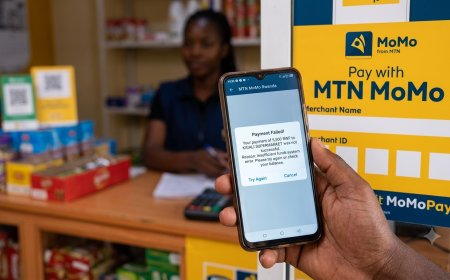
Trying to send money, pay a bill or make another payment with MTN MoMo and the transaction has failed? A failed MoMo transaction can be frustrating, especially when you are not sure whether the money has been deducted from your account.
The good news is that a failed transaction does not always mean your money is lost. The first step is to check the transaction status and your MoMo balance before trying the payment again.
In this guide, Fyndin explains the common reasons an MTN MoMo transaction can fail in Rwanda, what you should do when it happens, and when you need to contact MTN customer care.
Why Does an MTN MoMo Transaction Fail in Rwanda?
There are several reasons why an MTN MoMo transaction may not go through. The problem can be related to your balance, account status, network connection, transaction limits, the recipient's details or a temporary service problem.
1. Insufficient MoMo balance
The most obvious reason is that there is not enough money in your MoMo account to complete the transaction and cover any applicable fee.
Before sending money or making a payment, check your available balance. If the balance is too low, the transaction may be rejected.
2. Temporary network or system problems
Sometimes a transaction fails because of a temporary network or service problem. This can happen even when you have enough money in your account.
If the service appears unavailable, wait a few minutes and check again instead of repeatedly submitting the same transaction.
3. Incorrect recipient information
If you are sending money to another person, entering the wrong phone number can cause problems. Always check the recipient's number and the name displayed before confirming the transaction.
This is particularly important because successfully sending money to the wrong person is different from a failed transaction and may require a reversal request.
4. Transaction or account restrictions
Your account may have restrictions that prevent a particular transaction from being completed. Limits and eligibility can vary depending on the type of transaction and service being used.
MTN Rwanda currently advertises MoMo transactions of up to 10 million RWF per day, but the applicable limit can depend on the service and account circumstances.
5. Incorrect PIN or security issue
Entering an incorrect MoMo PIN can prevent a transaction from being completed. If you suspect that someone else knows your PIN or has accessed your account, contact MTN immediately rather than continuing to attempt transactions.
6. The recipient's account may have a problem
If you are sending money to another MTN MoMo customer, the issue may not necessarily be with your own account. The recipient's account could have restrictions or another problem preventing the transaction from being completed.
7. Merchant or bill-payment problems
Payments to merchants and bill-payment services can fail for reasons that are different from ordinary person-to-person transfers. The merchant number, account number, bill reference or the payment service itself may be temporarily unavailable.
What to Do When Your MTN MoMo Transaction Fails
Follow these steps before attempting the transaction again.
Step 1: Check the SMS confirmation
Look at the SMS you received after attempting the transaction. It can help you determine whether the transaction was successful, failed or requires further assistance.
Do not rely only on the message shown on your phone's screen. Check your actual MoMo notifications and account balance.
Step 2: Check your MoMo balance
Check whether the amount was deducted from your account.
There are two important situations:
- Money was not deducted: the transaction likely did not complete, so you can investigate the cause before trying again.
- Money was deducted: do not immediately make another payment. Keep the transaction details and contact MTN if the recipient did not receive the money.
Step 3: Check the recipient's number or payment details
If you were sending money, verify the recipient's phone number. For bills or merchant payments, verify the account, meter, merchant or reference number before making another attempt.
Step 4: Wait before retrying
If the failure appears to be caused by a temporary service problem, wait a few minutes before trying again.
Repeatedly submitting the same payment can make it harder to determine what happened if one of the attempts is later processed.
Step 5: Try another available channel
MTN Rwanda provides MoMo services through USSD and its MoMo App. The official MoMo App supports transactions and payments on Android and iOS devices.
If you were using the app and the service is not working, you can check whether the same service is available through the normal MoMo USSD channel.
What If My MTN MoMo Transaction Failed but Money Was Deducted?
This is one of the most important situations to handle carefully.
If your account was charged but the recipient did not receive the money, do not send the money again immediately. Keep the transaction SMS and note the amount, date, time and recipient details.
Then contact MTN customer care on 100 or visit an MTN service centre for assistance.
MTN Rwanda provides customer support for MoMo through its toll-free customer-care number and also provides a MoMo complaints channel.
How to Contact MTN Rwanda About a Failed MoMo Transaction
If the problem does not resolve itself, contact MTN and provide as much information as possible about the transaction.
Call MTN customer care
In Rwanda, you can call MTN customer care on:
100 — Toll-free MTN customer care
MTN's official website lists 100 as its customer-care number for Rwanda.
Contact MTN through WhatsApp
MTN Rwanda also lists WhatsApp support at:
+250 788 310 044
MTN also lists customercare.rw@mtn.com for Rwanda customer support.
Visit an MTN service centre
If the issue involves money that was deducted, an account restriction or another problem that cannot be resolved remotely, you can visit an MTN service centre with your identification and transaction information.
Information to Keep Before Contacting MTN
Having the transaction details ready can make it easier for customer support to investigate the problem.
- Your MTN phone number
- Transaction amount
- Date and approximate time of the transaction
- Recipient's phone number, if applicable
- Merchant or bill-payment details, if applicable
- The transaction ID or reference shown in your SMS
- A screenshot of the failed transaction, if available
Never give your MoMo PIN to another person. MTN customer support should not require you to disclose your confidential PIN to resolve an ordinary transaction problem.
What If the Same Transaction Keeps Failing?
If the transaction continues to fail after checking your balance and payment details, avoid repeatedly trying the same transaction.
Instead, check whether there is a wider service problem, then contact MTN customer care if the issue continues.
If the problem affects only one recipient or merchant, check the details you entered. If multiple unrelated MoMo transactions are failing, the issue may be related to your account, network or the MoMo service.
How to Avoid Failed MTN MoMo Transactions
- Keep enough money in your MoMo account for the transaction and applicable charges.
- Double-check the recipient's phone number before confirming.
- Make sure you have a stable mobile connection.
- Keep your MoMo PIN private.
- Do not repeatedly submit a transaction when the service appears delayed.
- Keep transaction SMS messages until you are certain the payment was completed.
- Check your balance after an unexpected transaction result.
- Contact MTN quickly when money has been deducted but the intended transaction was not completed.
Failed vs Reversed vs Wrong MTN MoMo Transaction
These terms can sound similar, but they describe different situations.
| Situation | What it means | What to do |
|---|---|---|
| Failed transaction | The attempted transaction did not complete. | Check the status and balance before retrying. |
| Money deducted but recipient did not receive it | Your account may have been charged even though the intended transaction was not completed. | Keep the transaction details and contact MTN. |
| Wrong transaction | The money was successfully sent to the wrong recipient or account. | Request assistance with a reversal as soon as possible. |
Can I Report an MTN MoMo Complaint Online?
Yes. MTN Rwanda provides an official MoMo complaints form where customers can submit details about their complaint, including their phone number, identification information and a description of the issue.
For suspected fraud, MTN also provides a dedicated MoMo fraud-reporting form.
What If I Think My MoMo Account Has Been Compromised?
If you notice a transaction that you did not make, treat it as a security issue rather than simply a failed transaction.
Contact MTN immediately through 100 and report the unauthorized activity. MTN also provides a dedicated fraud-reporting channel for MoMo customers.
Do not share your PIN, OTP or other confidential account information with someone claiming to be helping you recover your money.
Frequently Asked Questions
Why is my MTN MoMo transaction failing?
A transaction may fail because of insufficient balance, incorrect payment information, account restrictions, network problems, service interruptions or other transaction-specific issues.
What should I do if MoMo deducted money but the transaction failed?
Do not immediately repeat the payment. Keep the transaction SMS and reference details, check your balance and contact MTN customer care on 100 if the money remains deducted or the recipient did not receive it.
Can I contact MTN about a failed MoMo transaction?
Yes. MTN Rwanda lists 100 as its toll-free customer-care number. You can also use MTN's listed WhatsApp support or visit an MTN service centre.
Can I use the MoMo App if USSD is not working?
MTN Rwanda provides a MoMo App for Android and iOS that supports transactions and payments.
Should I try the transaction again after it fails?
Only after checking whether your first attempt actually deducted money. If money was deducted or the status is unclear, contact MTN rather than immediately making another payment.
How do I report MoMo fraud in Rwanda?
You can contact MTN on 100 and use MTN Rwanda's official MoMo fraud-reporting channel for suspected fraudulent activity.
Related Fyndin Guides
- How to Check MTN MoMo Transaction History in Rwanda 2026
- How to Reverse a Wrong MTN MoMo Transaction in Rwanda
- MTN MoMo Charges in Rwanda 2026
Official Sources
Final Thoughts
A failed MTN MoMo transaction does not automatically mean that your money is gone. The most important thing is to establish whether your account was actually charged before attempting the transaction again.
Check your SMS, verify your balance and payment details, and give a temporary service problem a few minutes to clear. If money was deducted but the transaction did not reach the intended recipient, contact MTN customer care on 100 and keep your transaction information available.
For suspected fraud or unauthorized transactions, contact MTN immediately rather than waiting for the issue to resolve itself.
What's Your Reaction?
 Like
0
Like
0
 Dislike
0
Dislike
0
 Love
0
Love
0
 Funny
0
Funny
0
 Angry
0
Angry
0
 Sad
0
Sad
0
 Wow
0
Wow
0